Frequently Asked Questions
Here are some of the most frequently asked questions received by our customer service team. If your question wasn't answered here, please contact us.
Most Frequently Asked
- How do I add a rental or resale posting?
- What is the cost of membership and postings?
- How do I find a timeshare for rent or sale?
- How do I contact an owner?
- How do I remove items from my cart?
- How do I change my email address or password?
- What to do if I've forgotten my password?
- Do you have a rental agreement?
- What is RedWeek Verified or Verified & Protected?
Search FAQ
Browse by Topic
Our Most Asked FAQ
-
How do I add a rental or resale posting?
-
Simply select "Post Your Timeshare" from the top of any page, choose either "Rent My Timeshare" or "Sell My Timeshare", and enter your point system or resort name to get started.
-
What is the cost of membership and postings?
-
Membership is currently $18.99 for 12 months and is required to add a rental or resale, or to contact an owner about a posting. Rental postings start at $39.99 for 6 months, and resale postings start at $59.99 for 12 months. A full list of pricing and benefits can be found on our pricing and details page.
-
How do I find a timeshare for rent or sale?
-
The easiest way to view units available is to browse by location, or conduct a search where you can filter results based on your needs.
If you would like to be notified as new postings are added, first browse to the specific resorts you are interested in, then select "Sign up for alerts" in the resort's rental and resale sections.
-
How do I contact an owner?
-
Once you find a rental or resale you are interested in, just click "Get in touch" to contact the owner, or RedWeek's full service team directly. If you are not already a member, you will be asked to upgrade your account in order to make the contact. Membership will also give you access to additional information from the owner and resort reviews.
Membership has a 30-day moneyback guarantee, so if you are unable to connect with an owner to arrange a transaction, please just let us know.
-
How do I remove items from my cart?
-
To remove items from your cart, sign in to your account and click on the "Cart" icon on the top right of any page. Once you are in your cart, just click "Delete" next to the item you'd like to remove.
-
How do I change my email address or password?
-
You can update your email address, contact info, or password by visiting My Account, on the top right any page. When you manage your account, you will see the option to "Edit your profile". Be sure to select "Save Changes" when you're done.
-
What to do if I've forgotten my password?
-
If you've lost or forgotten your RedWeek password, simply go to the sign in page and click on the "Forgot Password?" link next to the password field. By entering the email address associated with your RedWeek account, you will be sent an email with instructions on how to reset your password.
If you wish to change your password to something easier to remember, please sign in to your account, click "My Account" from the top of any page, and choose "Profile & Password" under the "Account Details" section to enter a new password of your choice.
-
Do you have a rental agreement?
-
Yes! All online bookings come with our custom-built rental agreement with protections for both parties. Renters will agree to these terms hen submitting their booking request. If you choose not to use our online booking, we highly recommend having some kind of written and signed rental agreement.
-
What is RedWeek Verified or Verified & Protected?
-
The RedWeek Verified flag means we have independently confirmed key details of the posting so you can feel confident in your transaction. Everything you see in the green box on a posting page has been professionally verified. Verified & Protected means that the posting has been verified, and it also offers secure online booking. For full details, please see our full RedWeek Verified FAQ
Renting or Buying a Timeshare
-
How do I inquire about a posting?
-
You will need to contact the owner of the posting directly. You can send an email inquiry by choosing the "Ask a question" option on any posting page. Membership is required, but if you are unable to complete the transaction, please contact us within 30 days for a full refund of your membership fee.
-
On RedWeek.com, timeshare owners post their own weeks for rent or sale, so we do not have any inventory other than what you see posted. You can request notification when new postings are added by clicking "Sign up for alerts" in the rental and resale sections of any resort page.
-
How do I complete a rental transaction?
-
Just submit a "Booking Request" to start the process. If the owner of the posting uses RedWeek's secure online booking system, your Booking Request will require you agree to the contract and submit your credit card for payment -- it will be confirmed for you within about 5 days. If the rental you are interested in doesn't offer online booking, the owner should provide you with further instructions.
-
Can I search by unit type or amenities?
-
We do offer a search by location, resort name, or brand, with additional filters on the results page for unit type, price, and dates. You can also browse resorts by location, timeshare company affiliation, or major attraction (beaches, casinos, golf, theme parks, and resorts that accept pets).
-
How do I find a rental or resale if I already know the posting number?
-
If you know the posting number, beginning with the letter R, type it into your browser at the end of the following URL: http://www.redweek.com/posting/
-
How long does it take for a response to an inquiry?
-
On RedWeek.com you almost always deal with an individual timeshare owner, rather than the resort's management or an automated reservation system. Most timeshare owners have jobs, families, and take their own vacations, all of which may cause a delay in response time. We typically ask that you give every owner one week to reply. If you have not received a response after one week, please send us the posting numbers you have inquired about so we can follow up.
-
Are nightly rentals available?
-
The majority of the rentals on RedWeek.com are posted directly by timeshare owners who have purchased a weekly interval. Since they must pay maintenance fees to use this week every year, nightly rentals are not often an ideal option. However, if you are willing to pay the full weekly rental price, staying for a shorter interval should not be a problem. Please contact the posting member directly to make such arrangements.
-
What currency is used for posted prices?
-
We ask our members to post all prices in $USD, but you should always double check when making an inquiry.
Adding Timeshare Postings
-
How do I rent my timeshare?
-
It's easy - just visit our Rent My Timeshare page to review your options — from the basic do-it-yourself rental, to our full-service rental option where RedWeek helps with adding your posting, managing inquiries, and finalizing the transaction.
With the DIY option, you have the choice to use RedWeek's online booking system, which includes a rental agreement and online credit card handling. If you don't use RedWeek's system, renters will contact you directly to work out the details.
-
How do I sell my timeshare?
-
You have a couple of options for selling your timeshare on RedWeek. Start on our Sell My Timeshare page to choose the option that works best for you.
-
How much does it cost to rent or sell my timeshare?
-
Postings can be added to your resort's page at a cost of $39.99 for each 6-month rental posting, and $59.99 for each 12-month resale posting. We also have full-service rental and full-service resale options available for a few dollars more. An active membership is required in order to post - just $18.99 for 12 months.
-
How do I edit my posting?
-
If you chose the DIY posting option, you can view and edit your postings in your Account. You can also edit your posting using the links at the top of your posting page. Keep in mind, if your posting has been "RedWeek Verified", you can edit the price and descriptions, but changing key details will require a new verification.
For full-service postings, please contact your assigned representative for any edits.
-
Can I post my floating timeshare week for rent?
-
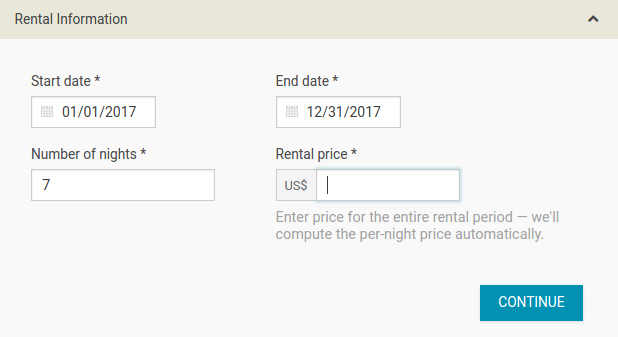
Yes, but you will need to use the DIY rental option. Full-service, verification, and online booking enhancements require a specific reservation.
When you add your floating timeshare rental, enter the full range of possible dates. For example, if all weeks are available, your entry might look like this:
-
How will I know when I have a renter or buyer?
-
If you choose a DIY option, interested parties will contact you by email through your posting page. The email will be sent directly to the address you registered with, and a copy will be sent to your Messages section on the RedWeek.com site. Even if you do not choose to respond to inquiries through the Messages section, be sure to check it regularly to make sure you haven't missed inquiries due to email filters.
-
Can I sell my timeshare points?
-
Yes, post your timeshare points for sale by going to the Sell My Timeshare page. Just enter the name of your point system, and go from there. Please note: points cannot be posted for RENT on RedWeek.com, but you can sell your entire points ownership.
-
Why isn't my posting showing up?
-
There are several possible reasons your posting may not be appearing on RedWeek.com:
- If your posting has never appeared on RedWeek, it may still be sitting in your cart awaiting payment. Postings require an additional fee on top of your membership. View your cart.
- Your posting has expired. Your posting expirations are separate from your membership expiration date, and renewing your membership does not automatically renew your postings. Membership is required in order to post, but postings require an additional fee of $39.99 for each 6-month rental posting, and $59.99 for each 12-month resale posting. You can monitor your posting expiration dates and renew postings from the My Postings page.
- The availability dates you posted have passed. Check the dates you had advertised on your posting from the My Postings page.
- Either you or a RedWeek.com staff member deactivated your posting before its expiration. If you deactivated your own posting before the expiration and want to use the remaining time, simply choose to "Reactivate" the posting from the My Postings page within your Account. If you did not remove your posting and none of the above explanations seem to fit, please contact us.
- If you chose the Full-Service option, you will not see your posting in your account immediately - look for an email from us letting us know what we need to move forward.
-
Do you offer full-service options?
-
Yes, RedWeek now offers both a full-service resale option AND a full-service rental option, where we can help with the whole process. Please see our full-service resale FAQ and full-service rental FAQ.
-
Can I use RedWeek's online booking system for my renters?
-
All owners now have access to use RedWeek for the rental agreement and payment handling — it's the standard method for all full-service rentals. If you're using the DIY rental method, just select RedWeek's online booking system as your preferred payment collection method when adding or editing your rental posting. Please see our RedWeek Online Booking System FAQ for more info.
Your Account
-
How do I change my information?
-
Click the My Account link from the top of any page. From there you can update your profile (name, email, password, phone, address), modify your postings, and change your email subscriptions. Please contact us for assistance in changing your username.
-
How can I renew my membership and/or postings?
-
Your membership can be renewed within 60 days of expiration through the My Account page. You can renew your postings within 30 days of expiration through the My Postings section of your Account.
-
Can I pay by check or money order?
-
You can pay for memberships, postings, and enhancements by check or money order. Just go ahead and add any items you wish to purchase to your Cart. When you are finished adding items, click the link under Payment Info in your Cart that says, "Prefer to pay by check or money order?". Some simple instructions for mailing in your payment will follow.
We are not able to take check or money order payments for online rental bookings.
-
What is your refund policy?
-
Generally, purchases made on RedWeek are non-refundable, with a few exceptions. View our full refund policy in the terms of service.
Contact Customer Service
If your question wasn't answered here, please contact us.